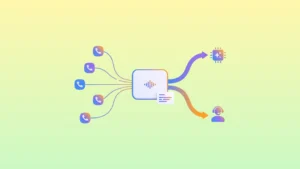
A sales team makes two hundred calls a day, and only about forty turn into real conversations. The rest of the time goes to dialing numbers, ringtones, voicemail, and attempts to get through a second time. The Outbound Dialer removes exactly this part of the work: the system dials the numbers itself and hands the operator only a live connection.
Below: what modes of automatic calling exist, how Progressive differs from Agentless IVR, which format suits whom, and what to prepare before launch.
What the Outbound Dialer Is, in Plain Terms
The Outbound Dialer is an outbound calling system that takes a contact base and dials the numbers according to a set logic instead of the operator. Depending on the mode, it either connects the agent to a customer who has already answered, or runs the whole conversation with a voice scenario. Every failed attempt is recorded, so a contact isn’t lost after the first ring.
Where Time Is Lost in Manual Calling
Three things eat up a campaign’s results before the conversations even begin.
- Operators wait instead of talking. Manual dialing and ringtones take up to half of an agent’s working time: instead of thirty conversations, a person has ten.
- A large base with low reach. Out of a hundred calls, about twenty answer, and the rest of the attempts vanish if there’s no repeat-contact logic.
- Routine that doesn’t need a person. Reminders, confirmations, and notifications are the same for everyone, yet they take up operators’ time every day.
After launching auto-dialing, NovaTalks clients recorded a 3.5x increase in successful conversations, a 70% reduction in operator idle time, and full coverage of missed calls.
Automatic Calling Modes
The Outbound Dialer has two main modes. They differ in who initiates the call and at what point a person joins the conversation.
| Mode | How it works | Who it suits |
| Progressive | The platform dials the next number after an agent is free and connects them to the customer only after the line is answered | Regular sales, service, and repeat calls |
| Agentless IVR | A voice scenario runs the conversation without an operator | Reminders, confirmations, mass notifications |
Table 1. Outbound calling modes and their areas of application
Progressive Dialer: The Operator Leads the Conversation
The system dials the numbers itself, and the agent receives an already-established connection after the subscriber answers. Ringtones, voicemail, and unavailable numbers stay outside their working time. In practice, the mode rests on four settings:
- connection speed: the agent hears the subscriber one to two seconds after the answer;
- parallel lines: the platform dials several numbers per agent when the base’s reach is low;
- Attempt Control: separate repeat-attempt logic for each type of result – “no answer,” “busy,” “voicemail”;
- self-service setup: the company’s team changes campaign parameters in the interface, without developers.
Agentless IVR: A Conversation Without an Operator
Fully automatic calling. The customer hears a personalized message into which their name, amount, order date, or any other variable from the record is pulled. The operator takes no part in the process.
- thousands of contacts in a matter of minutes;
- personalization from CRM data;
- a “connect to an agent” button right from the voice menu;
- setup together with the NovaTalks team.
This format is justified where the scenario is the same for the whole base and a simple action is needed from the customer: confirm, reschedule, find out. If the conversation requires argumentation or handling objections, an operator is needed.
Which Mode to Choose for a Specific Task
| Task | Mode | Why this way |
| Cold and warm sales | Progressive | A live conversation and quick agent connection are needed |
| Reminders about an appointment or payment | Agentless IVR | The scenario is the same, a live conversation isn’t needed |
| Order confirmation | Agentless IVR with a handoff to an agent | Most confirm on their own, the rest move to a person |
| Base reactivation, surveys | Progressive or IVR | Depends on the depth of the conversation and the campaign goal |
| Logistics notifications | Agentless IVR | Mass, uniform messages without an operator |
Table 2. Matching the calling mode to typical business tasks
What to Do with Missed Calls
A campaign loses the most on attempts after which nothing happened. A refusal at least gives a result, while a silent missed call leaves the contact in limbo. The repeat-contact logic describes how many times and at what interval the system returns to a number, at which hours and on which days to call, and how the scenario differs for the results “no answer,” “busy,” and “voicemail.”
The second level is cross-channel. If the customer doesn’t pick up, the system sends a message in Telegram, Viber, or by email. The customer gets the information in writing and reacts when it’s convenient for them, and the base doesn’t burn out from repeated calls.
How It Looks in Different Areas
Three scenarios that companies with a base of a thousand contacts or more launch most often.
- Sales. The time that used to go to dialing numbers and ringtones turns into conversations. The agent’s schedule doesn’t change; what changes is the ratio between waiting and talking to customers.
- Online stores. After the call, the system automatically sends the offer details to a messenger: the customer heard it by voice and has the same text at hand.
- Logistics and service. A courier’s arrival, an appointment reminder, an order confirmation go through without an operator, and the customer gets the information on time.
What to Prepare Before Launch
- A base with correct numbers in international format, without duplicates.
- A legal basis for the calls: up-to-date customer consents and a clear data source.
- A schedule and limits: calling hours, days of the week, the maximum number of attempts per contact.
- A script for operators or the text of a voice scenario with a list of variables pulled from the record.
- Rules for handing off from the voice menu to a live agent.
- Reporting from day one, so that after a week there’s something to base improvements on.
Which Metrics to Watch
The number of calls says nothing about the result. The minimum set of metrics for a campaign:
- base reach – the share of numbers that answered;
- the number of live conversations per agent per hour;
- operator idle time between conversations;
- the share of processed contacts – how many numbers received a final status, taking repeat attempts into account;
- conversion into the target action: an order, a confirmation, an appointment;
- the response to cross-channel messages after a missed call.
NovaTalks Outbound Dialer Capabilities
Both modes work in one interface with the rest of the communication channels. Below is what the NovaTalks Outbound Dialer can do.
- Progressive and Agentless IVR modes;
- Attempt Control – flexible repeat-attempt logic;
- loading a base via CSV or a selection from NovaTalks;
- cross-channel: Telegram, Viber, email on a missed call;
- personalization of the voice scenario from customer data: name, amount, date, and so on;
- real-time campaign analytics;
- flexible call limits and work schedules;
- team help with the first launch.
Frequently Asked Questions
Is an operator needed for automatic calling?
For the Agentless IVR mode, no – the voice scenario leads the conversation. For Progressive, an operator is needed; the system only removes dialing and waiting for an answer from their work.
How many contacts can be called at once?
In the Agentless IVR mode, thousands of contacts in a matter of minutes. In the mode with an operator, the speed depends on the number of agents on the line and the base’s reach.
What if the customer didn’t answer?
The repeat-attempt logic kicks in: the system returns to the number after a set interval and during permitted hours. In parallel, you can send a message to a messenger or by email, so the contact isn’t left without a response.
Can customer data be inserted into a voice message?
Yes. The name, amount, order date, and other variables are pulled from the contact record, so each person hears a message about their own situation.
Who sets up the calling campaign?
The Progressive Dialer is set up independently in the interface. The NovaTalks team helps you build the voice scenarios for Agentless IVR together, including at the first launch.
Conclusion
Automatic calling delivers results thanks to where the operator’s time is redistributed. Progressive removes ringtones and pauses from the agent’s work, Agentless IVR takes on uniform calls – reminders, confirmations, notifications – and the repeat-attempt logic together with cross-channel reach gets to the part of the base that is usually lost after the first call.
The simplest way to gauge the effect is to launch one campaign on a limited selection and compare the number of live conversations per agent before and after.